In justification of the generous 5* review, I have only played with the Plate, just toyed with the setup of the Workstation and watched quite a few videos presented by the Shaper team.
Boys and Girls,
I’m planning/have_started a series of reviews about the Shaper Origin and associated accoutrements:- 1. Shaper Origin.
According to the Shaper WEB site, the following is their overview of the workstation,
Workstation is designed to streamline your workflow and expand Origin’s abilities by offering rapid, repeatable, and precise fixturing of a wide range of stock configurations. Workstation features a reusable ShaperTape field, an easily adjustable shelf for small or difficult-to-fixture workpieces, indexing pins for easy alignment and registration, and an angled fence for aligning stock from 0-45 degrees. These features greatly reduce setup time and make it easier than ever to get cutting quickly.
I purchased the Origin/Workstation/Plate combo. So far I’ve only played with the Plate and toyed with the Workstation, however, the Workstation works on a “similar” concept but ideal for varied repeatable configuration.
The following items are packaged in the kit
and I’ll take a stab in an attempt to explain their use.
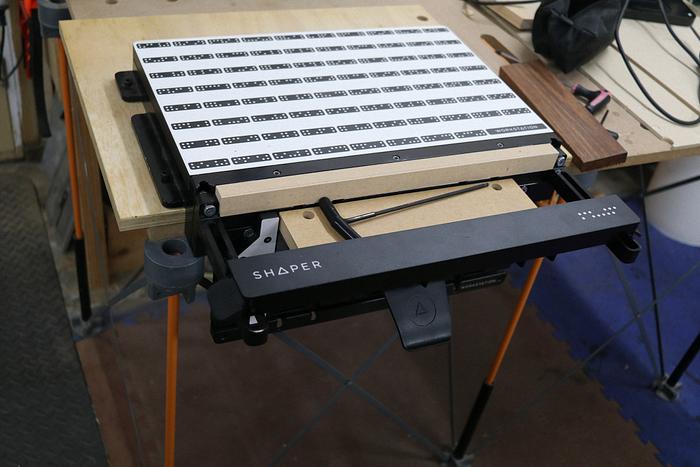
First off, I attached the body to a 19mm ply base
that I perforated to permit attachment to a MFT style tabletop using my TSO loc-dogs,
The clamping face can be attached to the body in one of the 3 numbered positions (1, 2 and 3),
using their locking mechanisms (4)
For the demo purposes, I chose position 2 so the top of the clamping face was 25mm below the body’s to, to demonstrate the use of the 25mm spoilboards… position 3 is 50mm below the top and the 50mm MDF is used... the spoilboards,
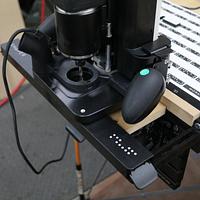
One of the features of the workstation is an adjustable shelf that uses its T-Slot connectors on the back of the Shelf,
inserted into two of the vertical tracks on the clamping face to support your workpiece,
With the support bar inserted in the slots at the top of the body, the shelf is slid up till the workpiece is stopped by the support bar(1),
and the lock handle on the shelf is engaged in the lock position (2).
Then it’s a case of router travel... if confined inside the workpiece, it can be butted up against the workstation,
or if there is edge work a spoilboard is inserted between the workpiece and the body,
to protect the workstation and minimise/prevent tear out..
I should emphasize that the workpiece is double sided taped to the shelf, and any through work will damage the MDF on the shelf and will eventually need to be replace.
Depending on the size of the workpiece, a support arm can be attached to both sides of the body
used to anchor the support bar,
to stabilise the Origin.
The face plate has two pins on either side that can be extended
to provide a 90° vertical surface for operations like tenoning. Push the workpiece against the pins and up against the support bar that has been locked on the top of the body,
for clamping and a spoilboard can be used if required,
with the support bar attached to the support arms for balance to the Origin.
Using those pins, an angle fence can be attached for those awkward shapes,
topping out on the support bar and subsequently used as support,
Phew, now I’m more exhausted writing than you might be reading.
More Shaper stuff to come… thanks for watching.
Don’t be crafty Craftisians,... SHARE your craft!
If your first cut is too short... Take the second cut from the longer end... LBD
Nice write up, ducky. I like the workstation for a lot of things, but I honestly end up using a piece of plywood that I covered in domino tape clamped to the benchtop as a reference plane more often than not, at least for flat items. The workstation comes into play really well for vertical work holding though…
Ryan/// ~sigh~ I blew up another bowl. Moke told me "I made the inside bigger than the outside".
Didn't expect the angle setting pins and dodads for tenons and such, good on 'em for thinking of that!
One problem I expect some will have is it seems a lot like a Leigh DR4. Put it away for a week and your brain resets to zero. Bring it back out and you need to figure it all out again (at least that's what happens with me).
That's similar to what I've been playing with, My domino "skin" is 6mm MDF and I use a 6mm spoiler skin below/adjacent to it, under the workpiece... both being the same thickness, all I have to do is build up under the domino "skin" with the same thickness as the workpiece. Using the TSO loc-dogs I have an unobtrusive clamping system. In the above picture I have pieces of 12mm MDF to lift up the dominos and under the shaper there is a 12mm workpiece with the 6mm spoiler underneath... that way I'll only have to replace 6mm thick MDF marred by the through cuts... closely considering 3mm "skins" as I only plunge through 0.5 to 1.00mm.
Still learning, but though introduction of the Shaper product(s) to Shaper newbies is opportunity lost if I waited to review once I mastered it, down the track.
If your first cut is too short... Take the second cut from the longer end... LBD




.png)


.png)